Write
“Project Atlas: the budget is approved. The next step is to call Marta.”
 ESTRATUM
The app that organizes your notes, tasks and appointments with AI
An idea, an appointment, something to do. Write it as it comes and get on with your day: Estratum sorts it for you. When you need it, ask in your own words and it finds it.
iPhone and iPhone Duo · Dark mode
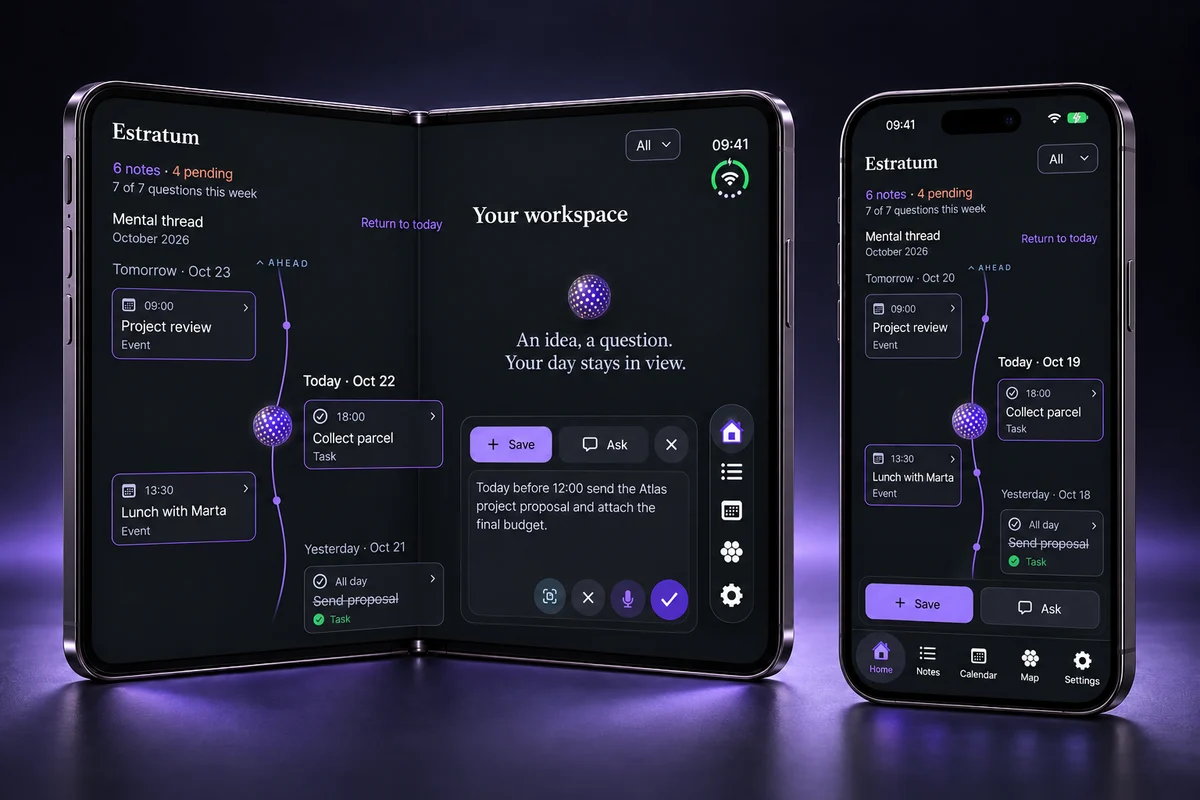
From a sentence to something you can return to
You do not need to remember where you saved it or how you wrote it. Ask however it comes to you.
“Project Atlas: the budget is approved. The next step is to call Marta.”
Estratum classifies the note and connects it to the others. No folders to set up, no tags to invent.
“What is next for Atlas?” It answers and shows you the notes it got that from.
Illustrative example with fictional data, not a recorded conversation. Answers depend on what you have saved.
Save one thing you want to remember. Start there.
For anyone who wants to look under the hood
Estratum turns a natural sentence into useful, retrievable information behind two simple actions: Save and Ask.
Ideas, appointments, projects, expenses or memories written as you think them.
Automatically organizes, tags and connects information.
Finds the note even when you search for it in other words.
It can put appointments in your schedule and help you receive the right reminder.
Choose compatible models in Settings: Qwen or Apple local, optional Apple Private Cloud Compute, or your external provider.
In local mode, compatible models classify and retrieve information on your device. Estratum combines meaning-based search with your schedule and structured data to answer questions about what you have saved. Open the related notes to review the information: an AI answer is not a substitute for checking an important detail.
Why Estratum and not another notes app
There are plenty of notes, task and productivity apps. This is what changes with Estratum.
Usually: you decide the folders, the tags and where everything goes.
Write as it comes and Estratum classifies, dates and connects it for you. To find it, ask in your own words: no need to remember how you wrote it.
Usually: the AI processes your notes on the company’s servers.
On compatible devices it sorts, searches and answers without sending your notes to any server, and works offline after the first download. It does not ask you to create an account, either.
Usually: one more monthly subscription.
Download it free and save as much as you want. If you want more, Pro is a one-time purchase: €29.99 in the Spanish App Store. No recurring fees.
Usually: the best AI, only for people who pay.
Pro removes the question limit and handles more for you, but it does not think better. Free gets exactly the same intelligence.
A general comparison with what is most common in notes and productivity apps, not with any specific app: each one has its own terms.
Try it with something that is on your mind today.
Fewer steps to remember. More room to live.
Save an idea with Siri or Shortcuts without opening the app. Estratum sorts it as soon as you are back.
Appointments, tasks and dated items in one view centered on today. See what is coming, revisit the past and return to today with one tap.
Write it like that in your note and it shows up every Monday in your calendar. Daily and monthly, too.
Reminders come earlier or later depending on what it is. If you ask for a specific lead time, yours wins.
Home and Work switch on their own when you arrive, and your appointments go to Apple Calendar without typing them twice.
Reminders, location, Calendar and Siri work with your permission. Everything worth knowing.
This is what Estratum looks like
The same way to save and ask, with a layout designed for each screen. Light and dark modes.
Notes, tasks and appointments in one app. Save without setting up folders. Find it by asking.
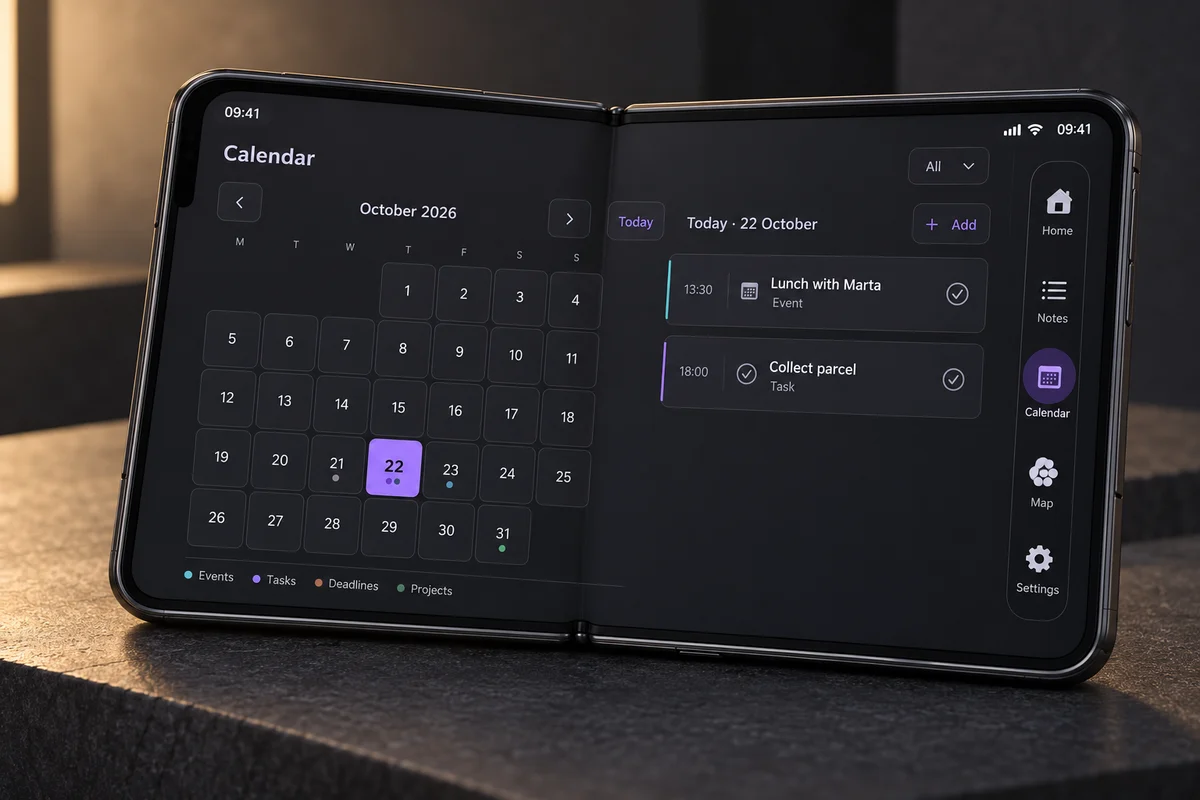
Your month and daily agenda, side by side. Estratum makes use of Duo’s inner screen.
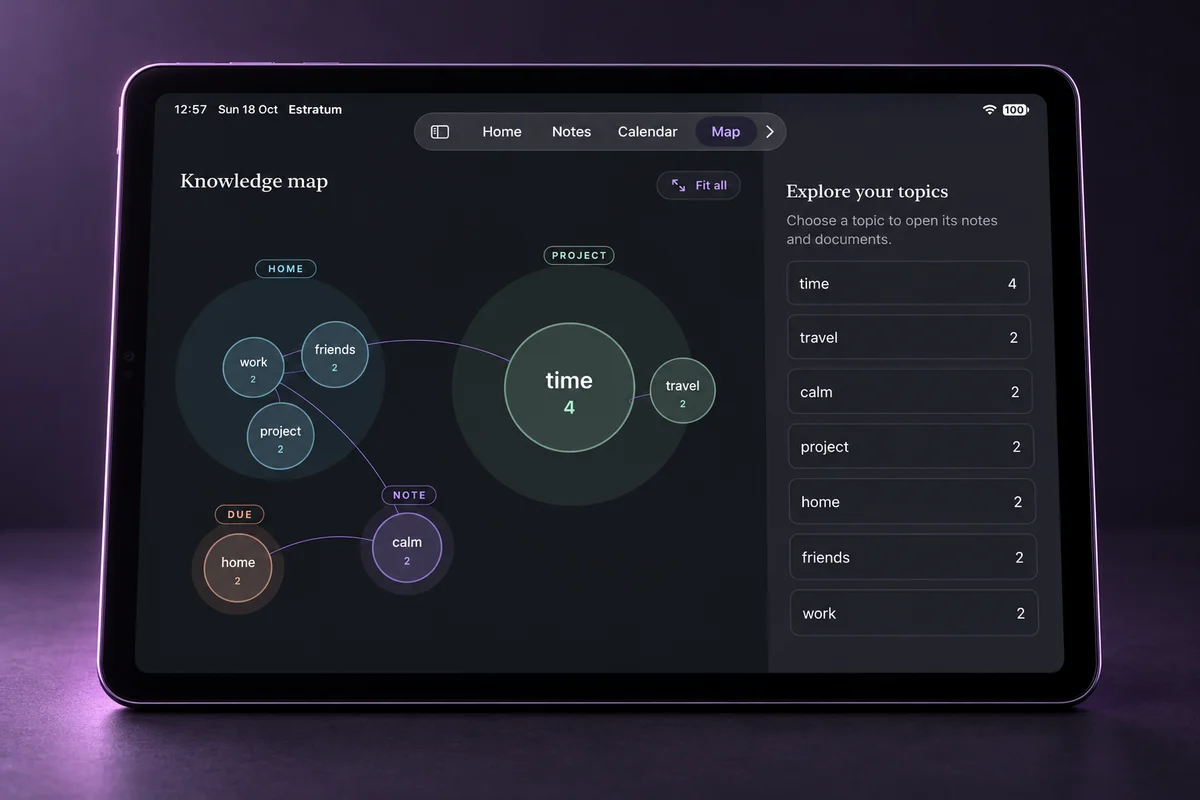
Explore the topics that connect your notes and open their content. A visual way back to your ideas, with Pro.
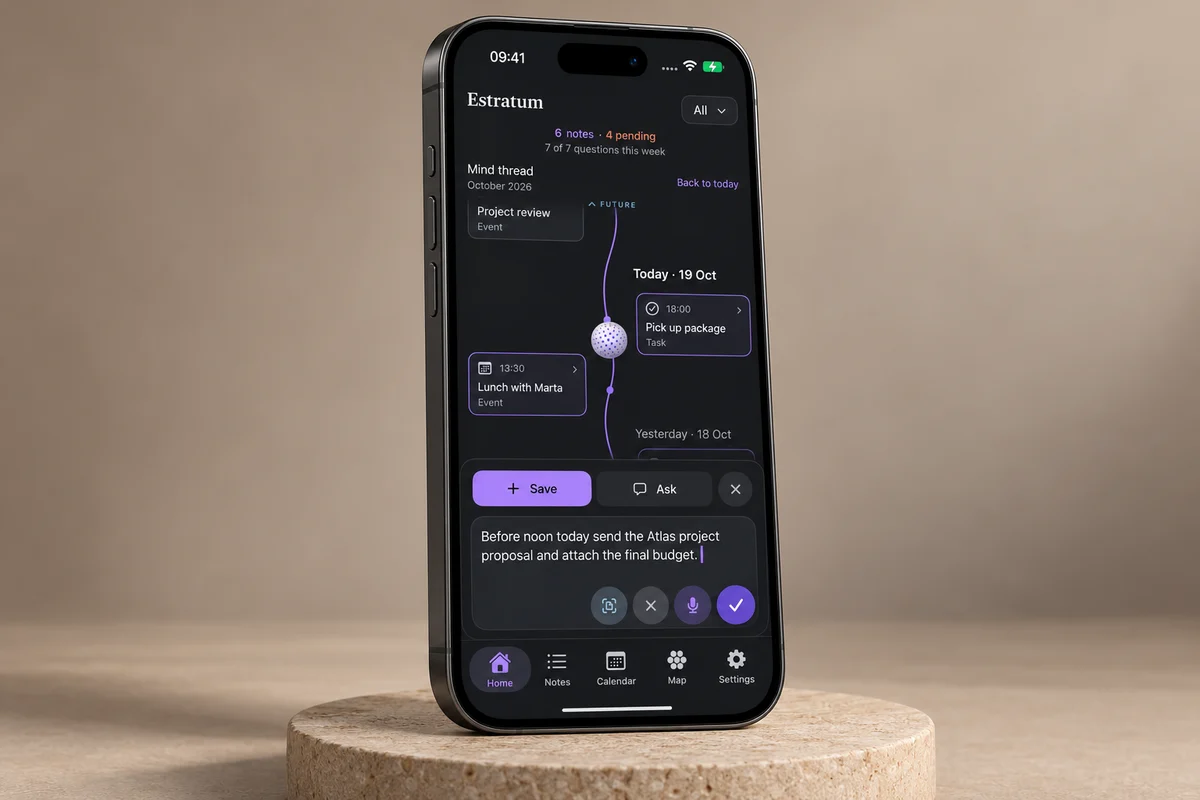
A sentence, an idea, something pending. Write or dictate it; let Estratum handle the organization.
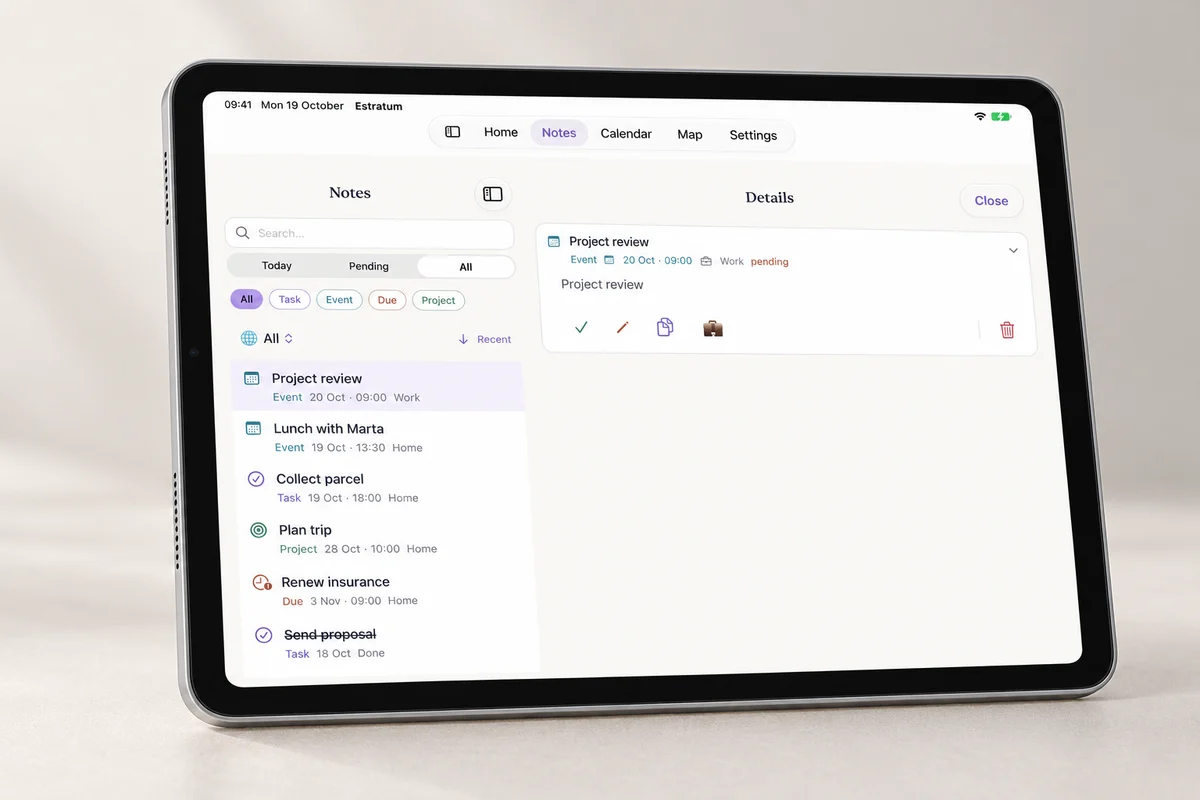
Search your list and open a note while keeping the others in view. On iPad, the space works for you.
Illustrative AI-generated mockups based on the interface, with fictional data; not official photographs or exact reproductions. The topic Map is part of Pro. Automatic note syncing between devices is not included.
iPhone and iPad · Same AI in Free and Pro · English and Spanish
From paper to a memory that answers
A printed appointment, a receipt, a whiteboard or a set of instructions. Estratum recognizes the text, lets you review it and organizes it without making you transcribe it or maintain another folder.
Keep the date, text and original alongside the rest of your context.
Retrieve decisions and next steps later by asking about the project.
Stop copying numbers by hand and keep the document connected to its note.
Timetables, cards and instructions stop getting lost in your camera roll.
The photo and the text reading happen on your device, and you review the text before saving. The photograph is never sent to the AI.

Built through real use
I am Bruno Pardini. I have always been drawn to artificial intelligence and tools such as Obsidian, Notion and Kanban boards. I am naturally chaotic, but at work I need to know that nothing important is left to chance.
The problem was that those systems never felt natural: maintaining them took the same time and mental effort they were meant to save. I designed Estratum so I could write the way I think and let AI do the work of organizing, connecting and remembering.
Today I use it to resume work exactly where I stopped, follow health processes, reconstruct timelines and save small details that may matter months later. Because AI can run on my iPhone, I capture every idea without thinking about tokens or usage cost, then retrieve it all in natural language.
“Since I started using Estratum, I carry far less mental pressure. The app you will use is the same one I use every day and, in my case, it has changed my life.”
Estratum and ADHD
ADHD can make it harder to organize time, remember tasks and appointments, prioritize or finish projects. Estratum does not treat ADHD: it is designed to reduce the friction between thinking of something, saving it and finding your way back to it.
“It disappears before I write it down”
Write or dictate one sentence without preparing categories, fields or a perfect structure. Organization comes later.
“I know I saved it, but I do not know where”
Ask in your own words. It finds it even if you do not remember how you wrote it.
“Everything competes for my attention”
The today view brings appointments, tasks and dated items together, so you do not begin by checking notes, calendars and lists separately.
“I started it, then lost the thread”
Save decisions, progress and next steps. When you return, ask where you left off and recover the context.
“The appointment was in my head… until it was not”
Estratum can recognize appointments and dates, place them in your schedule and help you receive a reminder without duplicating the effort.
“I abandon systems I have to keep feeding”
It does not depend on tidy folders, tags or a flawless daily review. Write first; Estratum organizes afterwards.
Estratum does not diagnose or replace treatment or professional support. The difficulties described are based on public information from NIMH and the NHS.
On-device AI on compatible devices
On compatible iPhone and iPad, Estratum sorts, searches and answers on the device itself: your notes are not sent to any AI server. After the first download it works offline, and you do not need to create an account.
Read the privacy policy →
On-device processing
Classifies · Searches · Answers
You choose where Estratum thinks, in Settings. Qwen and Apple local process on-device when compatible. Apple Private Cloud Compute is optional cloud AI: consent and internet are required, with an Apple quota separate from Pro. OpenAI and OpenRouter require your own key and may charge their own fees. With a cloud engine, the text of your notes and questions goes to that service; a document’s photograph never does. There is no silent switch to another provider.
A tool you can use without keeping count
Download it free: Free has the same intelligence as Pro. If you want unlimited questions and Estratum to handle more for you, unlock Pro with a single purchase. No subscription.
ESTRATUM FREE
ESTRATUM PRO
€29.99 in the Spanish App Store. Your local price is shown before you confirm the in-app purchase. Reminders, location and Calendar work with your permission.
Download free and try ProBefore you start
No. Free lets you save without a limit, organize your notes, use the schedule and ask 7 questions a week with the same AI as Pro. Pro is optional and purchased in the app, not a subscription.
No folders or tags to maintain. Start by saving something real you want to remember and return when you need it. You do not need to move all your notes on day one.
None to save and ask. Reminders need notifications allowed; automatic Home and Work switching needs location; sending appointments to your Calendar needs calendar access. With Siri or Shortcuts the text is saved right away and Estratum sorts it when you next open the app; voice and dictation depend on Apple. When Estratum detects a date or a repetition, check it: AI can get things wrong.
Local AI requires a compatible device and an initial download for models that need it. Estratum checks the available options. Below 6 GB RAM, Qwen is not offered; Apple local appears only when available. If your device cannot run a local engine, you can connect OpenAI or OpenRouter: they require internet, a provider account and key, and may charge their own fees. Buying Pro does not make a device compatible.
Not to Estratum. In local mode the AI runs on your device and there is no per-question cost. If you choose OpenAI or OpenRouter, that provider may charge you its own fees; Apple Private Cloud Compute has its own quota, separate from Pro.
No Estratum account is required. With a local engine, your notes are not sent to an AI server. Apple PCC and external providers are optional cloud services requiring your choice and consent. Downloads and purchases are managed through your Apple account.
Your mind is carrying enough already
You do not have to sort everything out now. Start by saving one thing you want to remember.
Download free on the App StoreFree · No account · Optional Pro, no subscription · iPhone and iPad